
 ARIES
 CURT
 LUVERNE
 UWS






Echo® Brake Controller Troubleshooting Guide
If your CURT Echo® brake controller is not behaving the way it should, the fix is often simpler than it seems. This page walks through common CURT Echo issues, what causes them, and the steps you can take to get back to smooth, confident trailer braking.
Whether you are dealing with brake lock-up at slow speeds, trouble connecting the controller to your phone, profile setup confusion, or one of the warning conditions listed in the manual, use the sections below to diagnose the issue and make the right adjustment.
Quick Troubleshooting Checklist
For users who want a faster starting point, this checklist is a smart way to eliminate some of the most common setup issues before spending time on more in-depth troubleshooting. Many CURT Echo problems can be traced back to simple causes such as incomplete connections, inactive trailer profiles, incorrect settings, weak power supply, or Bluetooth setup oversights. Running through these quick checks first can save time, reduce frustration, and often get the controller working properly again without needing more advanced diagnostics.
- Confirm the vehicle is running or ignition is in the ON position
- Make sure the Echo is fully inserted into the 7-way socket
- Check that the trailer plug is fully seated and free of corrosion, dirt, or moisture
- Verify Bluetooth is enabled on the phone
- Make sure the correct trailer profile is active
- Review max output and sensitivity settings
- Check LED status for power, pairing, and fault information
- Confirm the vehicle is supplying proper 7-way power and ground
Trailer Brake Lock-Up at Slow Speeds
For many users, one of the most noticeable setup issues is trailer brake lock-up or overly aggressive braking at low speeds. This can make stops feel jerky in traffic, parking lots, campgrounds, or other slower driving situations. In most cases, this is not a controller failure. It is a tuning issue.
When the CURT Echo is set too aggressively, the trailer brakes may apply too hard during lighter stops. This can happen if max output is too high, sensitivity is set too aggressively, or the current profile no longer matches the trailer’s weight, load, or real-world towing conditions.
Signs of brake lock-up or over-braking
- Trailer brakes grabbing too hard during light braking
- Jerky or abrupt stopping at lower speeds
- Trailer feels like it is holding the tow vehicle back too aggressively
- Braking behavior that feels harsher than expected in stop-and-go driving
How to Fix Trailer Brake Lockup
- Park safely and open the active trailer profile in the OneControl Auto app.
- Reduce the Max Output setting slightly.
- If braking still feels too aggressive, reduce Sensitivity as needed.
- Test the trailer brakes on a dry, level road at low-to-moderate speed.
- Continue making small adjustments until braking feels smooth, controlled, and confident.
As a general rule, output should be adjusted first, followed by sensitivity. The goal is a firm stop that stays just short of wheel lock-up. Anytime trailer weight, cargo distribution, road conditions, or tow vehicle changes, it is a good idea to recheck your settings.
Connecting & Pairing Issues
Bluetooth connection and pairing problems are another common frustration point for brake controller users. If the Echo will not connect, will not pair, or keeps dropping out during setup, the issue is usually related to power, permissions, pairing steps, or an old saved connection that needs to be cleared.
Because the CURT Echo relies on app-based setup and control, a clean connection between the controller and the mobile device is essential. In many cases, the fix is straightforward once the source of the problem is identified.
Common Symptoms:
- Echo not appearing in the app
- Pairing failure during setup
- App asking for a PIN but not completing connection
- Controller showing up previously but no longer connecting properly
- App failing to communicate with the controller consistently
What to Check First
Before resetting anything, users should verify a few basics:
- Echo has power and the LED is illuminated
- Controller is fully seated in the vehicle 7-way socket
- Trailer plug is connected properly, if needed for the current operation
- Bluetooth is enabled on the phone
- Required app permissions are allowed
- Correct six-digit PIN is being used
- Pairing is being done through the app, not through the phone’s Bluetooth settings menu
How to Reset & Recconect CURT ECHO
If the device was previously connected but will not reconnect correctly, clearing the connection and starting fresh often solves the problem.
- Open the selected trailer profile in the app
- Tap the Echo device name
- Remove the saved connection using the trash can icon, if shown
- Go to the phone’s Bluetooth settings and forget the device
- Return to the app and complete the pairing process again
If connection problems continue, users should also verify that the tow vehicle is supplying power and ground to the 7-way. Some vehicles require trailer mode, load detection, or a similar towing setting before 7-way power is active.
Trailer Profiles & Settings
Trailer profiles are one of the most useful features of the CURT Echo brake controller, but they can also be a source of confusion if users are switching trailers, changing loads, or towing under different conditions. If braking suddenly feels off, a mismatched or outdated trailer profile may be the reason.
Profiles help store important controller settings for specific towing setups. That means users can create and manage configurations based on the trailer, the tow vehicle, and expected towing conditions. When the wrong profile is active, or when settings have not been updated after a change in trailer weight or cargo, braking performance may not feel right.
Common profile-related issues
- Braking feels different after switching trailers
- Controller response no longer matches the current load
- Wrong profile is active in the app
- Saved settings need to be updated or cleaned up
How to Create a Trailer Profile
- Open the controller profile menu
- Select the + symbol
- Enter the tow vehicle and trailer description
- Save the profile
How to Activate a Saved Profile
- Swipe left or right through saved profiles on the home screen
- Bring the desired profile into the active position
- Select Open under the connected Echo device
How to Update or Delete a Profile
- Select the profile you want to edit
- Tap the pencil or edit icon
- Update the tow vehicle or trailer name as needed
- Save the changes, or choose Delete Profile if it is no longer needed
Key Settings Users Should Review
- Max Output for total braking force
- Sensitivity for how aggressively the trailer brakes respond
- Hazard Light Setting to prevent unwanted brake pulsing when hazard lights are active
Whenever towing conditions change, these settings should be reviewed and adjusted as needed. A profile that worked well on one trailer or load may not be ideal for another.
LED Status & Warning Lights
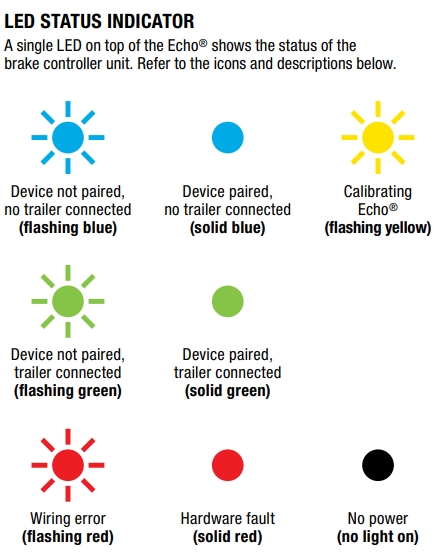
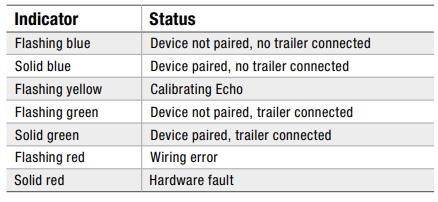
The LED indicator on the CURT Echo brake controller provides a quick visual snapshot of the controller’s current status. By checking the light color and whether it is solid or flashing, users can quickly identify pairing status, trailer connection status, calibration progress, or potential faults. If the Echo is not behaving as expected, the LED is often one of the fastest and easiest places to begin troubleshooting.
Additional Troubleshooting
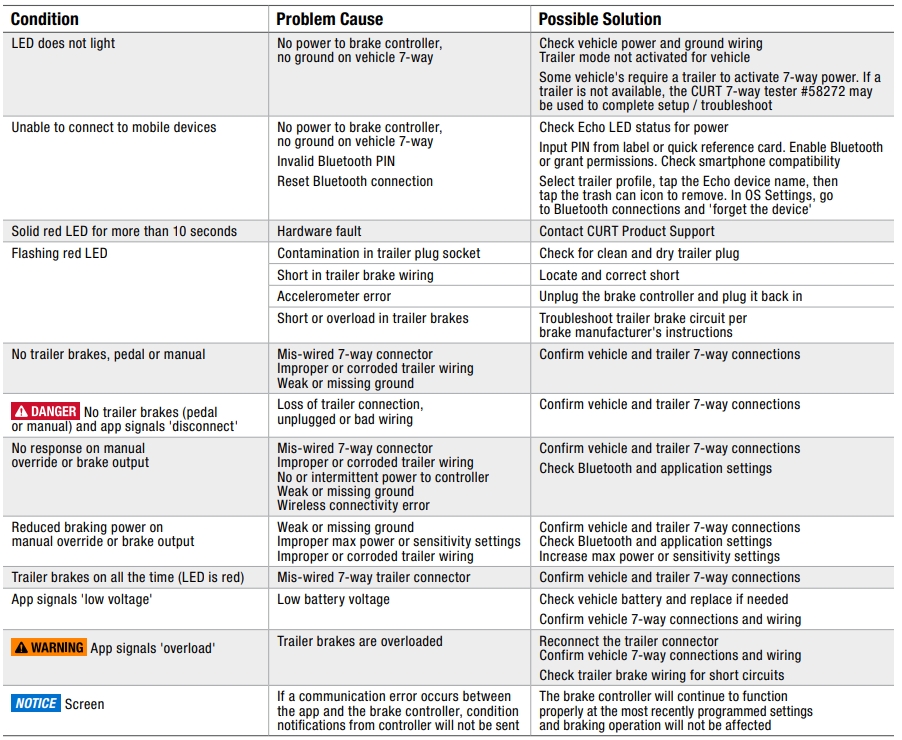
Before assuming a larger problem, take a moment to review the most common trouble points. A quick check of power, connections, wiring, and settings can often reveal the cause of the issue and help restore normal operation without more time-consuming troubleshooting steps.
LED does not light
If the Echo shows no light at all, the controller may not be receiving power or ground through the vehicle 7-way. In some vehicles, trailer mode or a similar towing function may also need to be activated before the socket supplies power.
What to check:
- Vehicle 7-way power and ground
- Trailer mode, tow mode, or load activation settings
- Connector seating and contact condition
Unable to Connect to Your Mobile Device
If the app cannot connect to the controller, the root cause may be loss of power, poor ground, an incorrect Bluetooth PIN, or a connection that needs to be reset and paired again.
What to check:
- Power and ground at the controller
- Correct six-digit PIN
- Bluetooth and app permissions on the phone
- Saved Bluetooth connections that should be cleared and re-paired
Solid Red LED for More Than 10 Seconds
A solid red LED that remains on for more than 10 seconds may indicate a hardware fault.
Recommended action: Contact CURT Product Support.
Flashing Red LED
A flashing red LED usually points to a wiring-related problem. That could include contamination in the plug socket, a short in the trailer brake wiring, an accelerometer error, or an overload condition in the trailer brakes.
What to check:
- Dirt, corrosion, or moisture in the trailer plug connection
- Trailer brake wiring for shorts or damage
- Controller connection and reinstallation
- Possible trailer brake overload condition
No trailer brakes from pedal or manual override
If the trailer brakes do not respond to either the brake pedal or manual override, the problem is often tied to wiring, grounding, or connection quality.
What to check:
- 7-way wiring and pin alignment
- Corrosion or damage in trailer wiring
- Weak or missing ground
- Connector fit and seating
App signals “Disconnect”
If the app displays a disconnect warning, the Echo may have lost trailer connection or the connector may not be fully seated.
What to Check:
- Trailer plug connection
- 7-way seating and retention
- Trailer-side wiring condition
No response on manual override or brake output
If the controller shows no output response during manual override or expected brake application, the issue may be caused by miswiring, intermittent power, poor ground, corroded wiring, or a wireless communication problem.
What to Check:
- 7-way wiring and connection quality
- Vehicle and trailer ground condition
- App connectivity and Bluetooth status
- Power delivery to the controller
Reduced braking power on manual override or brake output
If trailer braking works but feels weak, users may be dealing with low power settings, a weak ground, or degraded trailer wiring.
What to Check:
- Active profile settings for max output and sensitivity
- Ground integrity
- Wiring condition at the vehicle and trailer connectors
Trailer brakes stay on all the time
If the trailer brakes remain engaged continuously, the trailer 7-way may be wired incorrectly.
What to Check:
- Trailer-side 7-way wiring
- Pin function alignment between vehicle and trailer connectors
App signals “Low Voltage”
A low-voltage warning usually points to weak vehicle battery voltage or a power delivery issue.
What to Check:
- Tow vehicle battery condition
- Vehicle-side connector power
- 7-way wiring condition
App signals “Overload”
An overload warning may indicate that the trailer brake circuit is overloaded or shorted.
What to Check:
- Reconnect the trailer plug securely
- Inspect trailer brake wiring for shorts
- Verify 7-way wiring and connection condition
Important Note About App Communication
If communication between the app and the controller is lost, controller condition notifications may not be sent. However, the Echo will continue operating based on the most recently programmed settings. That means the loss of app communication does not necessarily mean braking has stopped, but the user should still resolve the connection issue as soon as possible.
Need Help Getting your CURT Echo Dialed in?
If you have already checked power, wiring, Bluetooth connection, trailer profile settings, and app setup but the issue continues, it may be time to contact CURT Product Support. This is especially important when the controller shows a solid red LED, repeatedly signals overload or wiring faults, or continues to brake improperly after settings have been adjusted correctly.
For best results, you should be ready to describe the LED status, app warning shown, trailer type, tow vehicle, and the troubleshooting steps already completed.
Disclaimers: These photographs, recommendations, and approximations are intended for demonstration purposes only and do not reflect the specifications of any particular tow vehicle, recreational vehicle, or trailer. Always consult the manufacturer’s Owner's Manual. All third-party product names, logos, brands, and other trademarks shown are the property of their respective trademark holders, and use of them does not imply any affiliation with or endorsement by them.